The Accurate Online Ruler for Any Screen
Calibrate once and hold an object against any ruler edge
Everything a Physical Ruler Does — and More
Built as a precise, editor-grade instrument. Clean, fast, and accurate on every device.
Rulers on Every Edge
Place a ruler on the top, bottom, left, or right — or all four at once for a full measuring frame. You choose exactly where it sits.
Three Calibration Methods
Match a credit card, auto-detect your device, or enter your screen diagonal. Calibrate once and every visit stays accurate.
Drag to Measure Anything
Draw a tape measure anywhere on screen and read the live length and angle. Copy the result with one click.
cm, mm & Inches
Switch units instantly. Millimeter ticks in metric, sixteenth-inch ticks in imperial, plus a raw pixels mode for design work.
Guides & Crosshair
Drop reference guides, or turn on a crosshair that reports live X and Y coordinates in your chosen unit.
Private & Fast
No accounts needed, and your calibration stays on your device. The ruler loads instantly on any device.
How It Works
Three quick steps to accurate on-screen measurements.
- 1
Calibrate Once
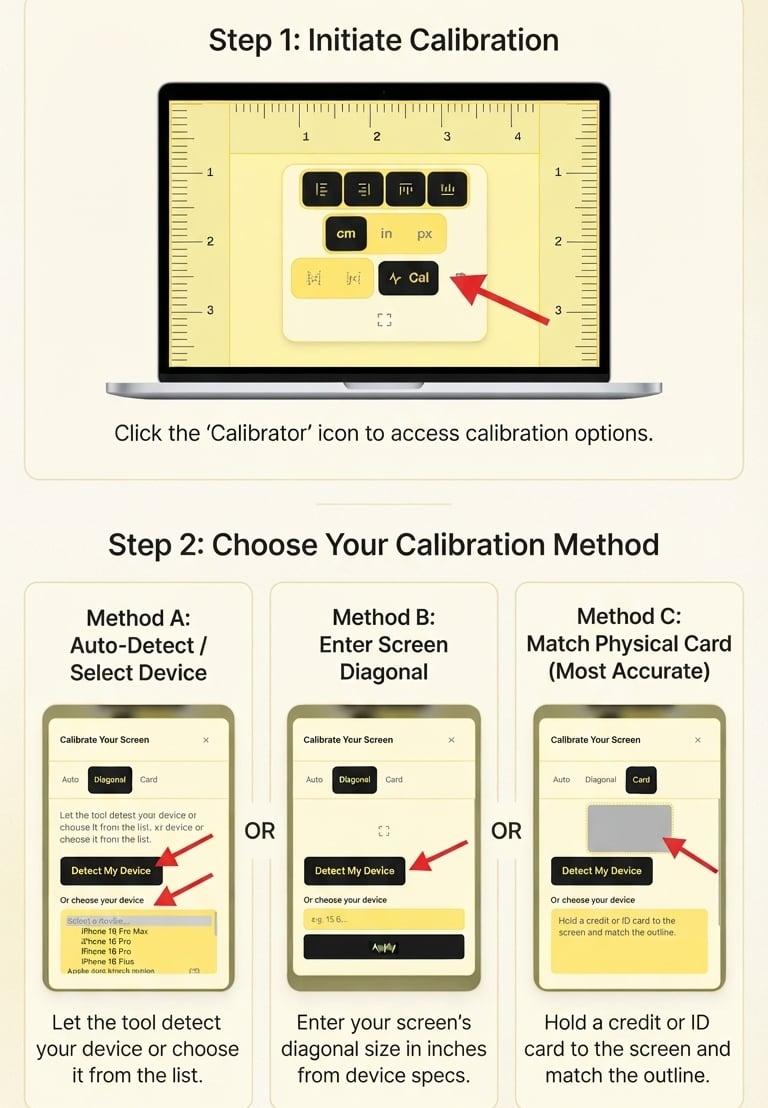
Open Calibrate and choose one of three methods: auto-detect your device or pick it from the list, enter your screen diagonal, or match a credit card against your screen.
- 2
Place Your Rulers
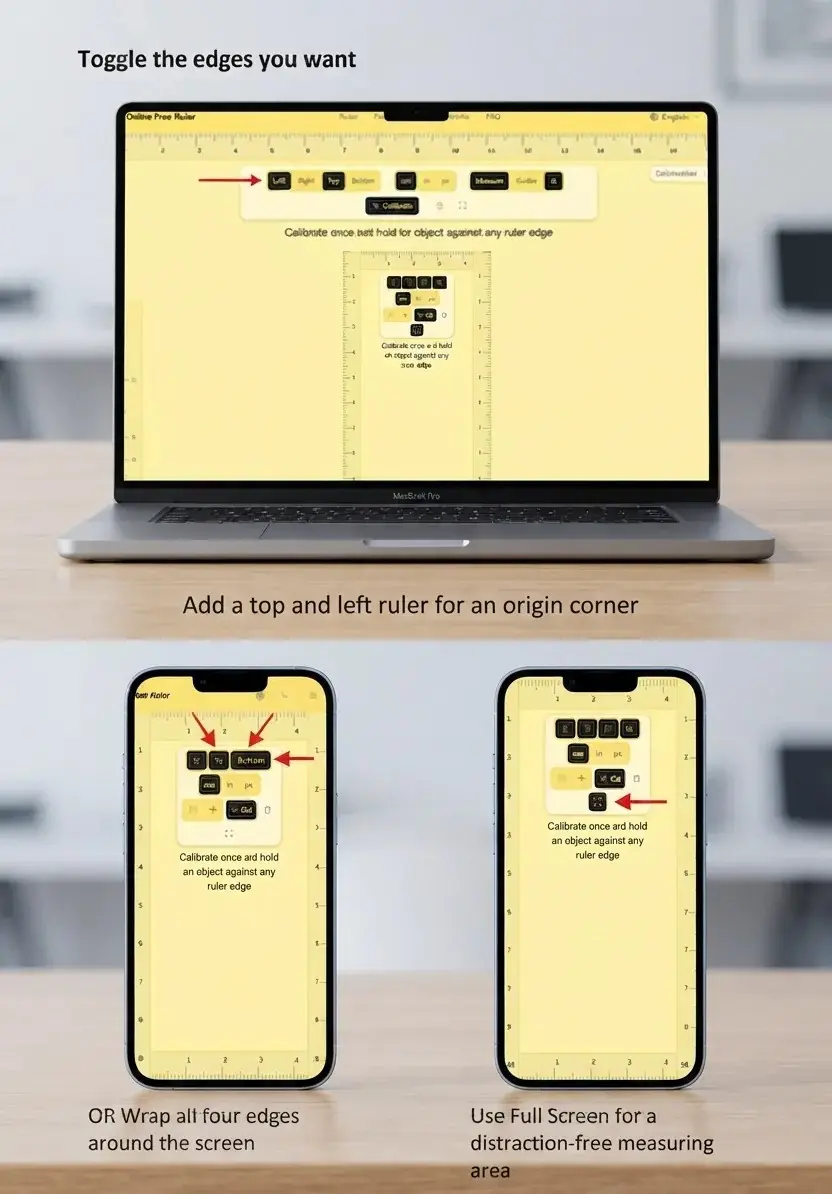
Toggle the edges you want. Add a top and left ruler for an origin corner, wrap all four edges around the screen, or use Full Screen for a distraction-free measuring area.
- 3
Measure
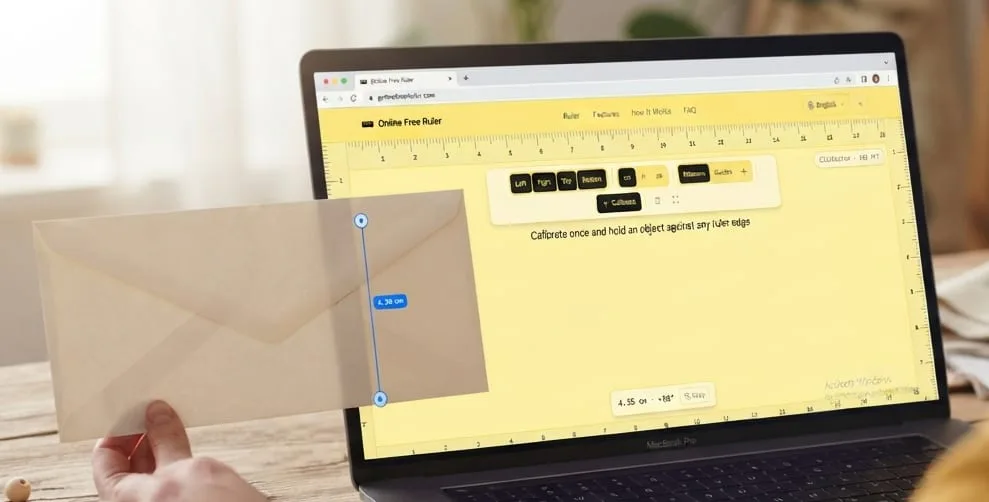
Hold an object against a ruler edge, or drag across the screen to measure any distance. Switch between cm, inches, and pixels anytime.
Online Ruler — True-to-Scale Screen Measurement in Inches, Centimeters & Millimeters
Online Free Ruler turns any desktop monitor, laptop, tablet, or smartphone display into a precise, actual-size measuring instrument right in your web browser. There is no software to install, no mobile app to download, and no account registration required. Whether you need an emergency 12-inch ruler to verify a printed drawing, a millimeter scale to size a small screw or electronic component, or an on-screen crosshair to inspect UI layouts in pixels, this tool renders true physical dimensions directly against your display glass. Because modern screens vary dramatically in native pixel density—from approximately 96–110 PPI on desktop monitors to over 460 PPI on high-resolution smartphone OLED panels—a quick one-time calibration links your device’s physical screen dimensions to real-world units of length.
The Science of Screen Calibration — Why Every Display Differs
Computer and mobile operating systems treat display measurements using virtual pixels rather than physical units. The World Wide Web Consortium (W3C) standard specifies a reference pixel assuming an arbitrary default density of 96 CSS pixels per inch. However, physical displays pack pixels at vastly different concentrations depending on panel size and native resolution. If an on-screen ruler assumed 96 pixels were always one inch on a high-density smartphone or a 4K laptop, the scale would appear far too small—distorting measurements by as much as 30% to 50%.
To achieve true 1:1 physical accuracy, Online Free Ruler calculates your display's exact Pixels Per Inch (PPI) using three reliable calibration methods:
- Standard Plastic Card Calibration (ISO/IEC 7810 ID-1): Every standard credit card, debit card, driver’s license, and transit badge worldwide adheres to strict international dimensions: exactly 85.60 mm wide by 53.98 mm high (3.370 × 2.125 inches). By holding any plastic card flat against your screen and adjusting the on-screen slider until the outline matches your card, you establish sub-millimeter calibration in seconds without needing to search for technical hardware manuals.
- Screen Diagonal Dimension Input: If you know your monitor or laptop’s advertised diagonal measurement in inches (such as 13.3″, 15.6″, 24″, or 27″), our calculator combines your active screen resolution with the Pythagorean theorem to compute the exact hardware pixel pitch.
- Automated Device Matrix Detection: The ruler inspects your browser’s viewport dimensions and Device Pixel Ratio (DPR), cross-referencing them against our database of factory-calibrated mobile, tablet, and laptop hardware profiles for instant one-click setup.
Measurement Units & Subdivision Hierarchy
The ruler supports seamless switching between metric, imperial, and digital units with a single keystroke or click, allowing you to transition between different measurement standards without losing your reference origin:
- Metric System (Centimeters & Millimeters): Features prominent numbered centimeter marks and clear millimeter ticks (1 cm = 10 mm), with a distinctive medium-height tick marking each 5 mm midpoint. This scale is optimal for measuring engineering fasteners, electronic components, drill bits, jewelry settings, and international stationery.
- Imperial System (Inches down to 1/16″): Provides a full 12-inch measuring span with five hierarchical mark heights: whole inches, half inches (1/2″), quarter inches (1/4″), eighth inches (1/8″), and sixteenths (1/16″). Adhering to the international yard and pound standard, one inch equals exactly 25.4 millimeters.
- Digital Pixel Coordinate Mode: Displays unscaled CSS pixel units along both axes. Ideal for UX/UI designers, digital artists, and web developers performing layout spacing checks, icon alignment audits, and responsive breakpoint testing.
Calibration Methods & Precision Standards
Selecting the right calibration method ensures consistent accuracy across different devices and operating systems. Compare the primary calibration workflows below:
| Calibration Method | Benchmark Standard | Typical Accuracy | Recommended Use Case |
|---|---|---|---|
| Plastic Card (ISO 7810) | 85.60 × 53.98 mm (credit card, ID) | ±0.2 mm / ±0.01 in | Fastest & most reliable across all unknown monitors and mobile phones |
| Screen Diagonal Entry | Manufacturer panel diagonal (e.g. 15.6", 27") | ±0.5 mm / ±0.02 in | Laptops, desktop monitors, and external displays with known specs |
| Device Auto-Detection | Native viewport & DPR database lookup | Factory spec | Recognized iPhones, iPads, MacBooks, and popular Samsung Galaxy devices |
| Browser Zoom Reset (100%) | Default 1:1 CSS zoom ratio (Ctrl+0 / Cmd+0) | Baseline | Mandatory baseline before taking physical measurements on any device |
Everyday Practical Applications & Measuring Workflows
Having an instant, calibrated ruler on your screen solves common measuring challenges when a physical tape measure is unavailable:
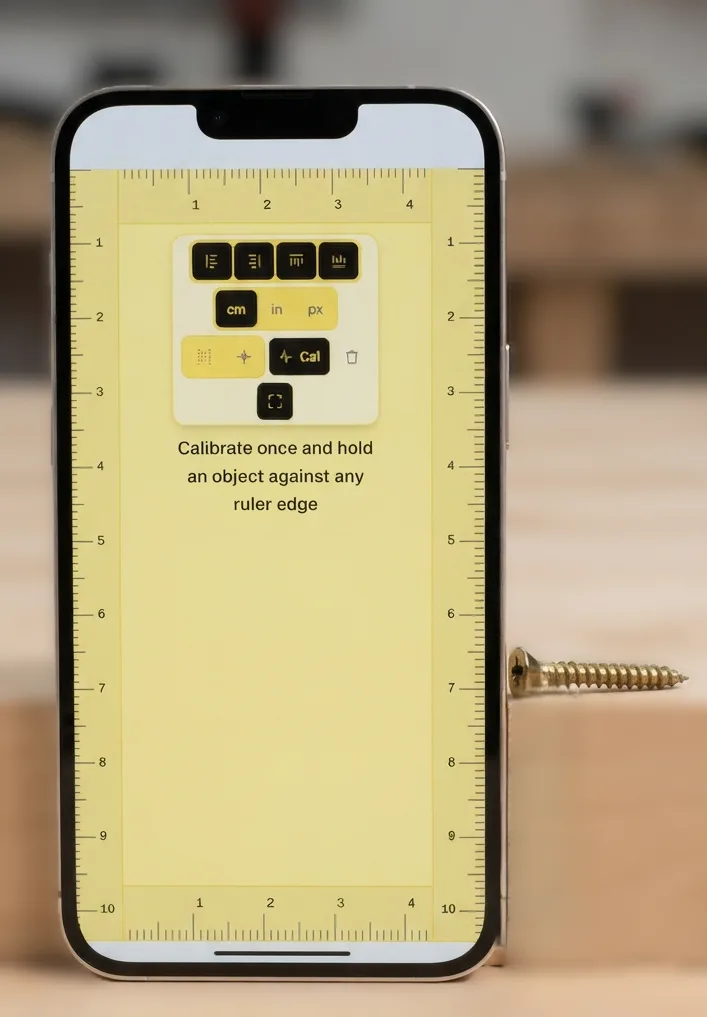
- Fasteners & Hardware Sizing: Identify machine screw lengths, bolt diameters, and washer dimensions before heading to the hardware store. Lay the fastener gently against the screen edge to read overall length, or use the drag tool to measure thread outer diameter.
- Jewelry & Ring Sizing: Measure the inside diameter of an existing ring in millimeters to find your exact size on international sizing charts (US, UK, EU, or Japanese scales) before buying rings online. You can also measure watch case diameters and lug widths.
- Crafts, Sewing & Quilting: Verify seam allowances (1/4″, 3/8″, 5/8″), ribbon widths, button diameters in lignes, and test-swatch gauge squares without interrupting your workflow.
- Postage & Packaging Dimensions: Check whether an envelope meets standard DL, C5, or C4 postal sizing, measure parcel thickness for letter rate qualification, and verify photo print margins before framing.
Pro Tips for Maximum Measurement Accuracy
Follow these best practices to ensure your digital measurements match physical reality with precision:
- Eliminate Parallax Refraction: Display panels have an outer protective glass layer between 0.5 mm and 1.5 mm thick that separates the illuminated pixels from the surface. Viewing ruler markings from an angle creates optical refraction that can shift your reading by 1 mm or more. Always position your line of sight perpendicular (at a 90-degree angle) directly above the mark you are reading.
- Keep Browser Zoom at Exactly 100%: Browser zoom changes the scale of rendered pixels. Always reset your browser zoom to 100% by pressing Ctrl + 0 on Windows/Linux or Cmd + 0 on macOS before calibrating or taking measurements.
- Account for OS Display Scaling: High-DPI laptops often apply 125%, 150%, or 200% system display scaling. The credit card calibration method automatically compensates for OS-level scaling by directly measuring physical pixels against a known object.
- Protect Your Screen Surface: Place objects gently onto the display. Never drag sharp metal tools, abrasive edges, or pointed objects across laptop or phone screens to prevent scratching the glass or damaging anti-reflective optical coatings.
Privacy-First Architecture & Zero Data Collection
Online Free Ruler is built with a strict privacy-first architecture. All unit calculations, coordinate tracking, drag measurements, and calibration settings execute entirely within your browser's client-side JavaScript engine. Your calibration values are stored locally in your browser's localStorage and never transmitted to external servers. We do not collect personal data, track your measurements, or require user registration. The tool remains fully operational offline once loaded, giving you a safe, private, and instant measuring instrument whenever you need it.
Frequently Asked Questions
How does an online ruler work?
An online ruler displays a scale on your screen. After you calibrate it for that display, align an object with the zero mark and read its length in centimeters, millimeters, or inches. Online Free Ruler also includes a drag-to-measure tool for distances away from an edge.
Do I need to calibrate the ruler?
Yes, calibration is recommended whenever you measure a physical object. Screens differ in pixel density, browser zoom, and display scaling, so an uncalibrated scale may not match real size. Matching a standard card on the screen is usually the simplest reliable option.
How do I read centimeters and millimeters?
In centimeter mode, the numbered long marks show whole centimeters. The smaller marks between them are millimeters, with 10 millimeters in 1 centimeter. Align one end of the object with 0, then read the mark at the other end.
How do I read inches on the ruler?
In inch mode, the numbered marks represent whole inches. The shorter marks divide each inch into halves, quarters, eighths, and sixteenths. The distance from 0 to 1 is one inch, or exactly 25.4 millimeters.
Can I use my phone as a ruler?
Yes. Open the site in your phone browser, calibrate the screen, and place a small object flat against an edge ruler. This works well for everyday objects that fit on the display. Recalibrate if you change browser zoom, display settings, or device.
Can I measure something larger than my screen?
Use the drag-to-measure tool to compare two points that are visible on screen, or measure the object in sections and add the results. For large or critical measurements, use an appropriate physical tape measure or other purpose-built instrument.
What is pixel mode for?
Pixel mode measures screen coordinates and spacing in CSS pixels. It is useful for checking layouts, images, and design alignment. Pixels do not represent a fixed real-world length unless the display has been calibrated.
How accurate is an online ruler?
Accuracy depends on careful calibration, 100% browser zoom, display settings, and how you position the object. It is suitable for everyday checks, but it is not a replacement for certified measuring equipment in medical, safety, legal, engineering, manufacturing, or other high-precision work.